
MICROSOFT POWER AUTOMATION PROJECTS
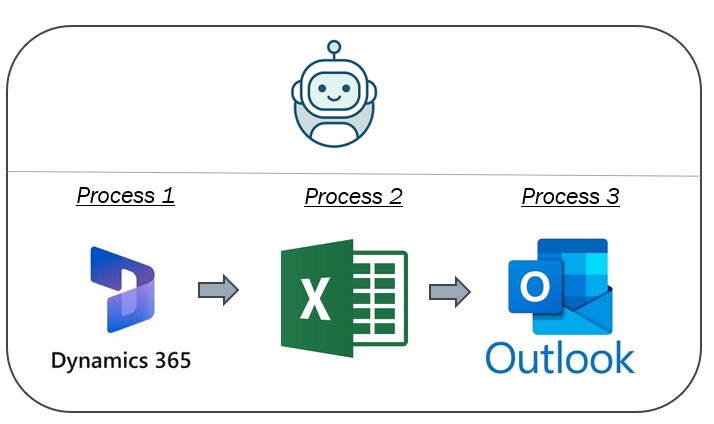
Utilizing Power Automate within the Microsoft ecosystem provides a seamless approach to optimize workflows by automating the data handling process for Microsoft Dynamics 365 (D365). Begin by setting up a flow that automatically initiates the extraction of D365 data, ensuring meticulous filtering and selection criteria to isolate relevant information. This data is then transformed into a structured format, typically in Excel, allowing for intuitive manipulation and analysis. Upon successful formatting, integrate comprehensive logical conditions to prepare customized email templates that encapsulate key insights derived from the analyzed data. The final step involves utilizing Power Automate's robust connectors to dispatch these emails promptly to predetermined stakeholders, ensuring timely communication that enhances decision-making processes. This meticulous orchestration not only streamlines operations but also underlines an organization’s commitment to leveraging innovative automations for increased efficiency and accuracy in business intelligence dissemination.
1)Automation on Interfacing tools Dynamics 365 Application, Excel & Email
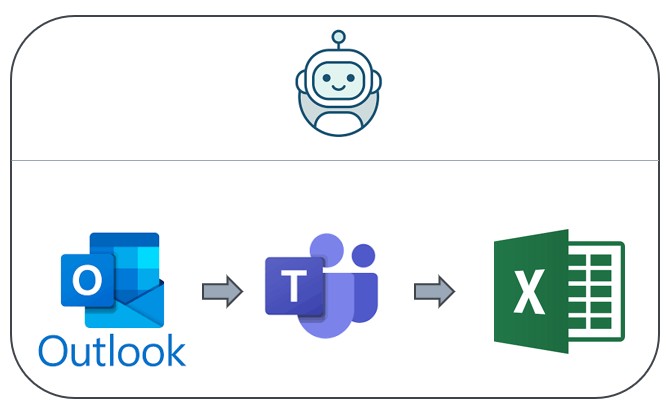
Power Automate offers a seamless and efficient solution for automating the archiving of email communications, thereby optimizing organizational workflows. By deploying Power Automate, you can systematically back up all emails to a secure location such as OneDrive or SharePoint, ensuring data integrity and accessibility. The flow is capable of incrementally updating a counter that tracks these archived emails in real-time within a Microsoft Teams chat, fostering transparency and interdepartmental communication. Additionally, this automation extends its capabilities by recording pertinent details—such as sender, subject line, and timestamp—in an Excel spreadsheet stored on a collaborative platform like SharePoint or OneDrive. This dual integration enhances both archival processes and analytical possibilities while reducing manual labor and human error. Leveraging Power Automate for email management thus constitutes an effective strategy for organizations aiming to enhance operational efficiency through digital transformation initiatives.
2)Automation on Backing up Email, updating in Teams chat and updating the email in excel
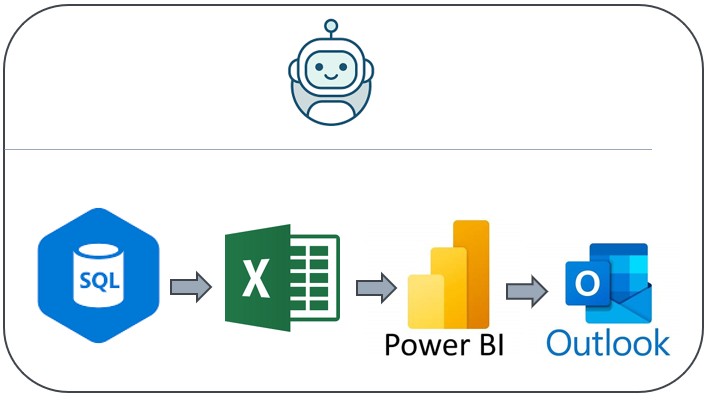
3) Automation on downloading SQL data, processing it in excel, creating dashboard in Power BI and sending link in email
Leveraging Power Automate to download SQL data and process it through Excel for subsequent visualization in Power BI represents a highly efficient workflow that facilitates streamlined data management. By configuring automated flows, businesses can seamlessly extract vast amounts of data from SQL databases at scheduled intervals or triggered by specific events. Once the data is available, it transitions into Excel, where users can modify and refine datasets using advanced formulae or macros to meet analytical requirements. Subsequently, this curated data set is imported into Power BI, allowing teams to craft interactive dashboards that deliver dynamic insights and foster data-driven decision-making. Finally, leveraging Power Automate's email capabilities ensures timely distribution of a dashboard access link to relevant stakeholders via an automated email feature, thus ensuring all parties are up-to-date with real-time analytics and facilitating continuous operational efficiency improvements within the organization. This integration highlights a synergy between Microsoft tools, promoting
Contact
Phone
krishhh1991@gmail.com
+61-455435496
© 2025. All rights reserved.
LOCATION
East Perth, WA-6004